How are tabs in KiKit created?
When you place multiple PCBs into the panel via appendBoard(), KiKit expects
you to generate a so-called partition line for each individual board. The
partition line is an oriented (poly)line that partitions the free space between
the boards. It gives you the information "this part of the free space belongs to
this board and this board is responsible for placing tabs in that space". So for
a regular input the partition line can look like this:
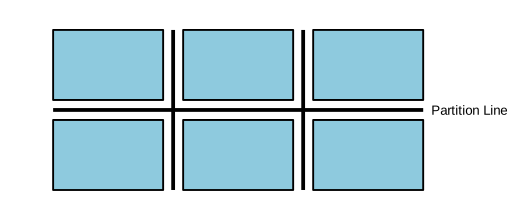
For more complicated input, it can look like this:
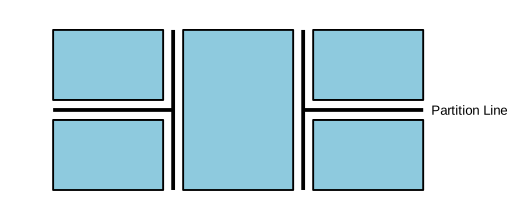
Note several facts:
- partition line is used for backbone generator
- partition line is not generated automatically, it is up to the user to
generate it. KiKit offers Panel.buildPartitionLineFromBB that builds the
partition line based on bounding boxes of the individual boards (from
Panel.substrates). If you need possibly more complicated lines, you have to
implement them by yourself.
- partition line is used for deciding if an annotation yields a tab or not - if
the tab does not hit the partition line, it is not created.
- when we create partition line from bounding boxes, we include "ghost
substrates" (passed as boundarySubstrates) representing framing or rails
that will be added in the future. These ghost substrates simulate a
neighboring board at the panel boundary so that partition lines — and
therefore tabs — are generated on those edges too.
- Important: Only boards added via appendBoard() are considered for
partition lines. Material added via appendSubstrate() (e.g., manually
created rails) is merged into the panel outline but does not affect
partition line generation. To account for such material, pass it as a
boundary substrate to buildPartitionLineFromBB.
When KiKit generates a tab, it generates it based on tab origin, direction and optionally the partition line. When a tab is successfully generated, it consists out of two components - a piece of a substrate (which will be later appended to the panel) and a cut-line.
So assume we have the following PCB outline (the PCB is below the line, there is a free space above the line):

Then you specify your tab origin and its direction:
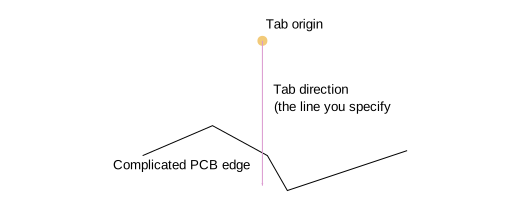
This is your input (e.g., via an annotation). Now KiKit does its job; it shoots
two rays tabWidth apart and looks for the intersection with existing
substrates. Note that if the ray starts within the PCB, no intersection will be
found.
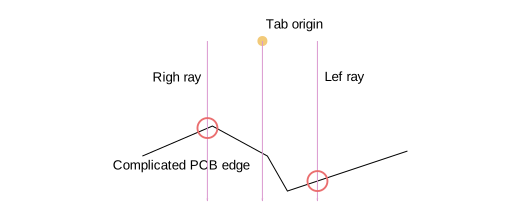
Once we have the intersections, we can easily generate the tab substrate and the cut:
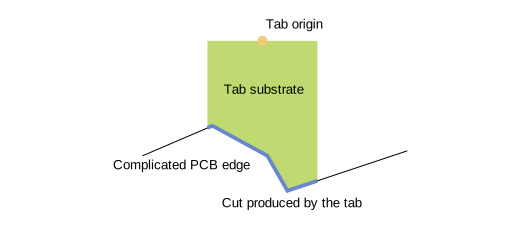
Note that if we specify a partition line, than we shoot new rays in the opposite direction and try to hit the line. If we manage to do so, we get a tab. Otherwise, no tab is generated.
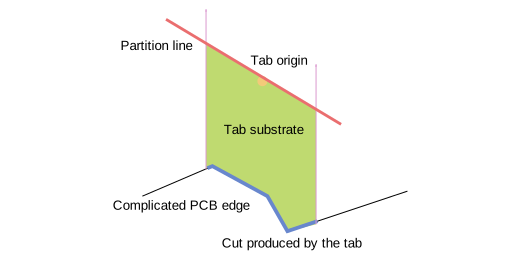
This is the basic algorithm for generating tabs. Well, we might also call them "half tabs". KiKit usually generates the half tabs around the board bounding box and then expects that two half tabs in the middle of the panel will merge into a single one. Also, KiKit first generates all the tabs and then merges them in one step to the board substrate. The cut is just a polyline which is in later steps either rendered as a V-cut or via mousebites.